

LOD stands for Level of Development. In BIM, it defines how detailed and reliable a model element is at a given stage of the project. It is not just about how the model looks. LOD describes how much the project team can trust the information in the BIM model for decisions about coordination, fabrication, and construction.
The concept was introduced by the American Institute of Architects (AIA) and later expanded by the BIM Forum to give teams a common language for describing model readiness. Without it, one team’s “done” model might be another team’s rough draft. LOD solves that by setting clear expectations about what a model element represents at each stage.
LOD in Construction vs. Level of Detail
These two terms get mixed up all the time, but they mean different things.
Level of Detail
The level of detail is about how the model looks. A column modeled with rounded edges, bolt holes, and surface texture has a high level of visual detail. But that visual detail does not tell you if the column’s size, location, and material data are accurate enough to fabricate from.
Level of Development
Level of Development is about how much you can rely on the model element for real project decisions. A column at LOD 400 might look simpler than a heavily rendered one, but its geometry, connections, and fabrication specifications are accurate enough to send to a steel shop.
A BIM model can look detailed and still not be reliable for construction. That is the distinction that matters.
How LOD Is Used Across Project Phases
LOD levels are not random numbers. They map to the stages of a construction project. As the project moves forward, the model elements get more defined and more trustworthy.
Planning
Early models at LOD 100 are conceptual. They represent building massing, general layout, and design intent. The model is useful for feasibility studies and initial cost estimates, but the model elements are not accurate enough for coordination.
Design Development
Models at LOD 200 and LOD 300 carry real dimensions, accurate geometry, and system-level information. The structural elements show actual member sizes. The architectural layout shows real wall thicknesses and door locations. This is where multi-disciplinary coordination starts.
Construction
At LOD 350 and LOD 400, the BIM model carries enough detail for clash detection, construction coordination, and fabrication. Structural elements include connection details. MEP systems include fitting types, pipe sizes, and hanger locations. Fabrication-level models at LOD 400 are used to produce shop drawings and prefabrication sheets.
Post-Construction
LOD 500 represents as-built conditions. The model reflects what was actually constructed, not what was designed. Facility managers use LOD 500 models for maintenance schedules, asset tracking, and space management. This is where BIM data supports long-term facility management.
LOD Levels Explained
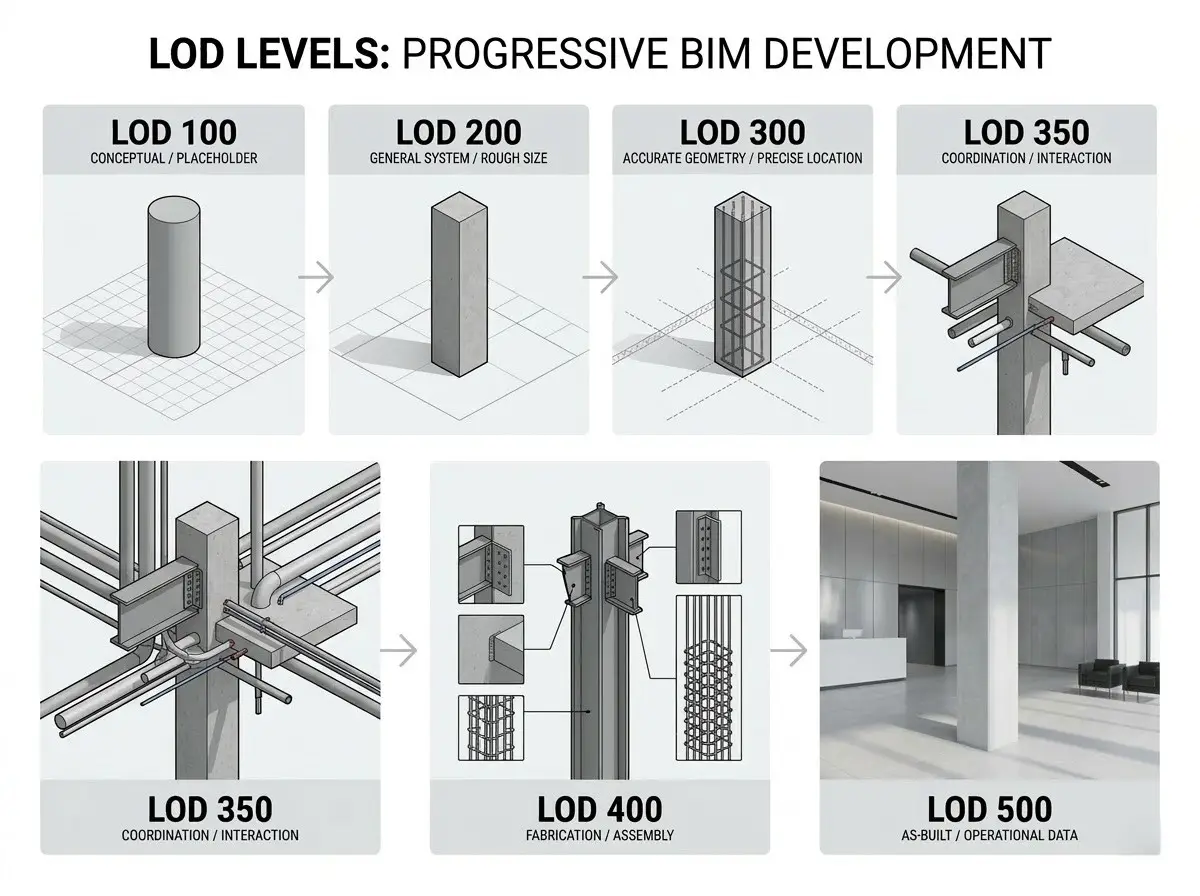
The AIA originally defined five BIM levels of development. The BIM Forum later added LOD 350 to fill a gap between design coordination and fabrication. Here is what each level means in practice.
LOD 100
Conceptual design. Model elements are represented as basic shapes, volumes, or placeholders. A structural column at LOD 100 might just be a generic cylinder showing approximate location. Useful for building massing, area calculations, and early cost estimation.
LOD 200
General systems with approximate size, shape, location, and orientation. A column at LOD 200 shows the right cross-section type and rough position, but the exact dimensions and connections are not finalized. Used during schematic design and early design development.
LOD 300
Accurate geometry and dimensions. Model elements are specific to the project and carry real measurements. A column at LOD 300 shows the actual member size, material, and precise location within the structural grid. Used for design coordination and construction documentation.
LOD 350
Coordination-level detail. Model elements show how they interact with elements from other disciplines. A column at LOD 350 includes information about connections to beams, slab edges, and penetrations for MEP systems. This is the level where clash detection between building systems becomes reliable. LOD 350 was added by the BIM Forum because the jump from LOD 300 to LOD 400 was too large for construction coordination to work well.
LOD 400
Fabrication and assembly level. Model elements carry enough detail to be fabricated or assembled from the model data. A steel column at LOD 400 includes base plate details, bolt patterns, and connection geometry that a fabrication shop can use to produce shop drawings. This is the fabrication level model that supports prefabrication sheets, spool drawings, and field installation.
LOD 500
As-built conditions. The model represents the final constructed state of the building. Model elements have been verified against field conditions and updated to reflect what was actually installed. LOD 500 is used for facility management, maintenance schedules, and long-term building operations. In some cases, LOD 500 data feeds into digital twins for ongoing asset tracking and energy analysis.
Why LOD Matters in BIM Projects
LOD is not just a technical specification. It affects how every team on the project uses the BIM model.
- LOD tells each discipline how much they can trust the model elements from other teams. A structural engineer looking at an MEP model at LOD 200 knows not to design around those exact pipe locations because they are approximate.
- LOD drives coordination quality. Running clash detection on LOD 200 models produces unreliable results because the model elements are not precise enough. At LOD 350, the clashes are real and the resolutions are meaningful.
- LOD reduces errors during construction because the expected accuracy is defined up front. When everyone agrees on the LOD, there are fewer surprises about what the model does and does not represent.
- LOD helps project managers plan BIM scope and budget. Higher LOD takes more time and costs more to produce. Defining the right LOD at each phase keeps the BIM modeling effort focused on what actually matters for the project stage.
- LOD aligns expectations between owners, designers, and contractors. When the LOD is documented in the BIM execution plan, every stakeholder knows what they are getting and what decisions the model can support.
How LOD Impacts Coordination and Clash Detection
LOD and coordination are directly connected. The accuracy of the coordination depends on the accuracy of the model, and that is defined by the LOD.
At LOD 200, structural elements and MEP systems are approximate. Running clash detection at this level flags hundreds of conflicts that are not real because the elements are not in their final positions yet. That wastes time in coordination meetings.
At LOD 300 and LOD 350, the model elements are placed with real dimensions and real routing. Clash detection at this level produces results that the project team can act on. Beam penetrations, pipe crossings, and duct clearances are verified against actual geometry. This is the level where construction coordination produces real value.
At LOD 400, the model is detailed enough for virtual construction sequencing and fabrication. Coordination at this level is about confirming installation order and verifying that prefabricated assemblies will fit.
Common Challenges with LOD in Construction
- Misunderstanding LOD DefinitionsTeams sometimes treat LOD as visual detail instead of information reliability. A model that looks good does not mean it is ready for coordination or fabrication.
- Inconsistent LOD Across DisciplinesWhen the architect delivers LOD 300 and the MEP engineer delivers LOD 200, the coordination results are unreliable. All disciplines need to be at the same LOD for the coordination to work.
- Higher LOD Takes More Time Modeling to LOD 400 takes significantly more effort than LOD 200. Poor planning around LOD requirements can blow up modeling timelines and budgets.
- Scope CreepWithout clear LOD definitions in the BIM execution plan, teams sometimes over-model early in the project or under-model when it matters most. Defining LOD by phase keeps the effort matched to the project’s needs.
Where LOD Is Used in Construction Projects
- Commercial construction where multi-discipline coordination is standard
- Healthcare facilities with dense MEP systems and strict code requirements
- Industrial buildings with process piping, equipment pads, and complex structural elements
- Residential developments with repeating floor plates that benefit from LOD standardization
- Infrastructure projects where structural elements and civil systems need coordination
LOD becomes more important as project complexity increases. On a simple tenant fit-out, LOD 300 might be the ceiling. In a hospital or data center, LOD 400 is often the minimum for MEP systems.
How HSE Contractors Support LOD-Based BIM Workflows
HSE Contractors works with teams across the country on projects that require specific LOD standards at every phase. The LOD is defined during project scoping and built into the modeling and coordination workflow from day one.
For discipline-specific modeling at any LOD, HSE provides BIM modeling services covering architectural, structural, and MEP systems. For coordination that depends on consistent LOD across all trades, BIM coordination services manage the federation, clash detection, and resolution process.
For teams that need help defining LOD standards and BIM execution plans before modeling starts, BIM consulting services cover the planning side.
Why LOD Matters More Than Ever
Construction projects are getting denser, schedules are getting tighter, and the number of trades sharing the same building space keeps going up. LOD gives project teams a way to define exactly how much they can rely on the BIM model at each stage. That clarity drives better coordination, fewer field conflicts, and more predictable construction outcomes.
Getting the LOD right is not about modeling everything to the highest level of detail. It is about matching the model accuracy to what the project actually needs at each phase. That is where the real value sits.
Get Expert Guidance on Your Construction Project
Schedule a complimentary 20-minute consultation with our BIM Modeling experts and receive personalized guidance on optimizing your project’s performance. Our offices in Orlando, New York City, Boston, Los Angeles, San Francisco, Miami, Tampa, Chicago, Denver, Brooklyn, Dallas, and Washington, DC offer innovative solutions nationwide, Contact Us Today!
