
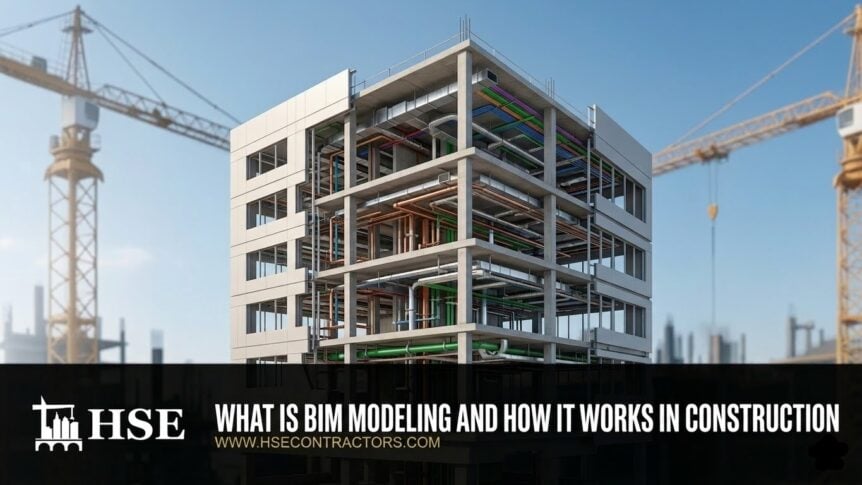
What Is BIM Modeling and Why Does It Matter in Construction
BIM modeling is the process of creating a digital representation of a building that includes both the 3D geometry and the project data behind it. Building information modeling is not just a 3D model. A BIM model carries information about materials, dimensions, spatial relationships, system connections, and construction sequencing, all in one place.
That combination of geometry and data is what separates BIM from traditional drafting. The model becomes a shared reference that architects, engineers, and contractors all work from. Instead of each team maintaining its own set of drawings, the building information lives in a coordinated model that updates as the project moves forward. That is why building information modeling has become the standard workflow on most commercial construction projects in the construction industry today.
How BIM Modeling Works on Real Projects
The BIM process is not a single step. It runs across the full life of a construction project. The digital models start during the design phase, get used during the construction phase, and can carry on into building operations after the project is done.
Planning and Design
The BIM model is built from architectural, structural, and engineering design information. Architects model the building layout. Structural engineers model the framing. MEP engineers model the mechanical, electrical, and plumbing systems. Each discipline builds its piece, and the models are combined into a coordinated digital representation of the full building. This is the stage where BIM modeling services do the bulk of the work.
At this stage, the model is used to test design ideas, check spatial relationships, and start identifying conflicts between systems before anyone produces construction documents.
Construction
During the construction phase, the BIM model becomes a coordination tool. The combined model is reviewed for clashes between disciplines. Duct routes are checked against structural framing. Plumbing risers are verified against electrical panels. The model is updated through coordination rounds until the trades have a routing plan they can build from.
BIM models also support construction sequencing when linked to timeline data (4D BIM) and cost estimation when linked to quantity and budget data (5D BIM). Some teams extend this further with 6D BIM for sustainability analysis and energy performance tracking. This gives project managers a way to simulate the build sequence, track costs against the model, and evaluate the building lifecycle impact of design decisions.
Operations
After construction, the BIM model can continue to support the building. Facility managers use BIM data for facilities management tasks like maintenance planning, equipment tracking, and space management. The model becomes a digital record of what was actually built, not just what was designed. Project information that was embedded during modeling and coordination stays with the building through its full lifecycle. This is where BIM data starts to overlap with digital twin technology, which we cover further down.
BIM vs. CAD
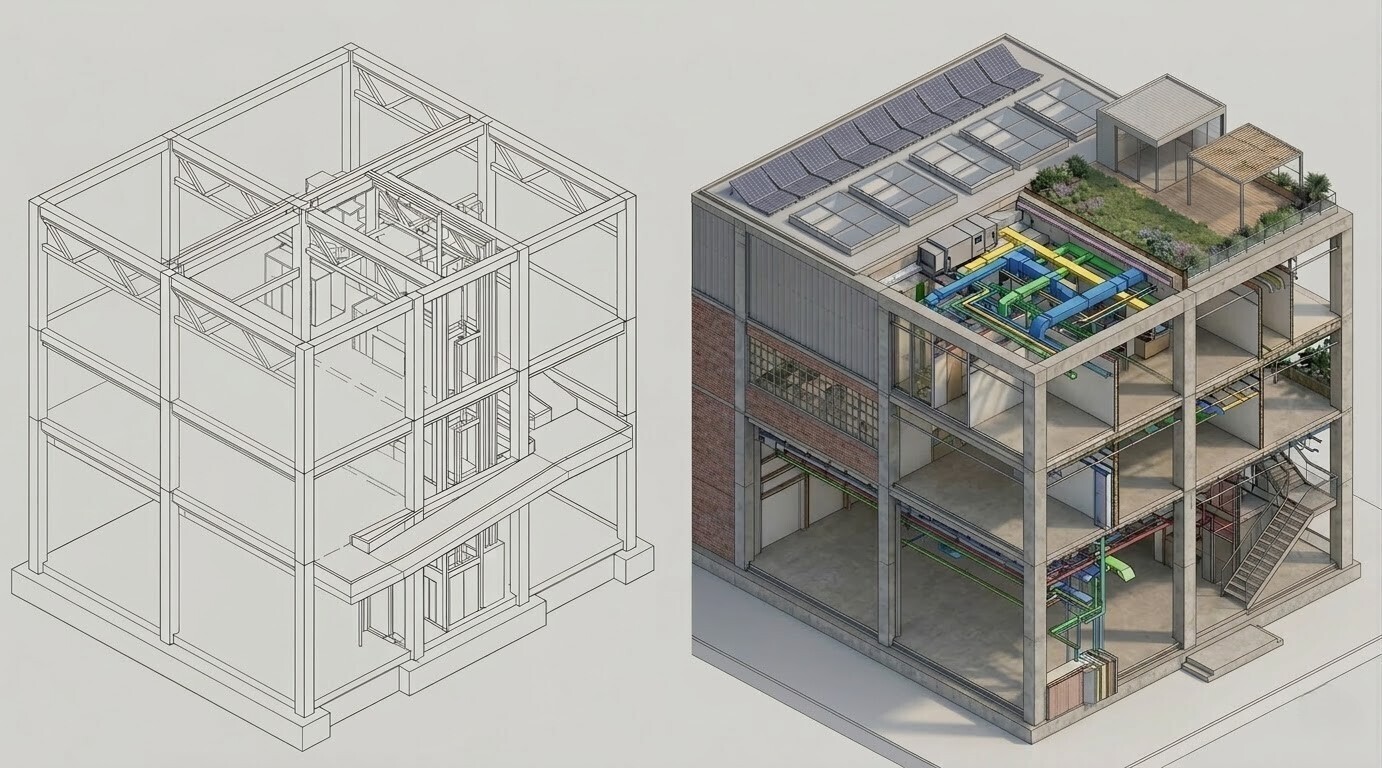
The difference between BIM and CAD comes down to what the file actually contains. A CAD file is a drawing. Lines, dimensions, and annotations. But those lines do not carry data about what they represent. A line that represents a wall in CAD does not know it is a wall. A BIM model is different. Every element is an object with properties like thickness, material, fire rating, and room assignment.
Here is how the two compare on the things that matter most in construction:
| CAD | BIM | |
| OUTPUT | Produces drawings (2D sheets or isolated 3D geometry) | Produces a data-rich building model that generates drawings from it |
| COORDINATION | Each drawing is a separate file. Changes in one do not update the others | One change to the model updates every view and schedule automatically |
| DATA | Lines and annotations only. No embedded material or system data | Every element carries properties like dimensions, materials, and cost attributes |
| MULTI-DISCIPLINE USE | Mostly single-discipline drafting. Hard to coordinate across trades | Built for multi-discipline modeling where architectural, structural, and MEP systems coexist |
| PROJECT LIFECYCLE | Documentation-driven. Mainly used during design | Supports planning, coordination, construction, and facility operations |
CAD is not dead. Many firms still use AutoCAD alongside BIM for detail sheets and site plans. But for multi-discipline coordination and construction documentation, BIM has become the stronger workflow.
Core Features of BIM Modeling
What makes BIM useful on construction projects comes down to a handful of features that traditional workflows cannot match.
3D Modeling of Building Systems
Every building element is modeled in three dimensions with real geometry. Architects, structural engineers, and MEP engineers all build their systems in the same coordinate space, which makes it possible to see how everything fits together before construction.
Data Attached to Every Element
Each object in the model carries properties like material type, manufacturer data, dimensions, and cost attributes. That data feeds into schedules, quantity takeoffs, and documentation without manual entry.
Multi-Discipline Collaboration
BIM allows multiple teams to work on the same project model. Architectural, structural, and MEP models are built separately and then federated into one coordinated environment for review.
Clash Detection and Issue Tracking
When models from different disciplines are combined, automated clash detection identifies where systems conflict. Clashes are logged, assigned to the responsible trade, and tracked through resolution. This is the step that prevents the most expensive rework on a construction project. On most commercial builds, BIM coordination is where clash detection happens as part of a structured review process.
Model-Based Documentation
Floor plans, sections, elevations, and schedules are all generated from the BIM model. Because the documentation is tied to the model geometry, it stays consistent when the design changes. No more manually updating 30 sheets because a wall moved.
BIM Levels Explained
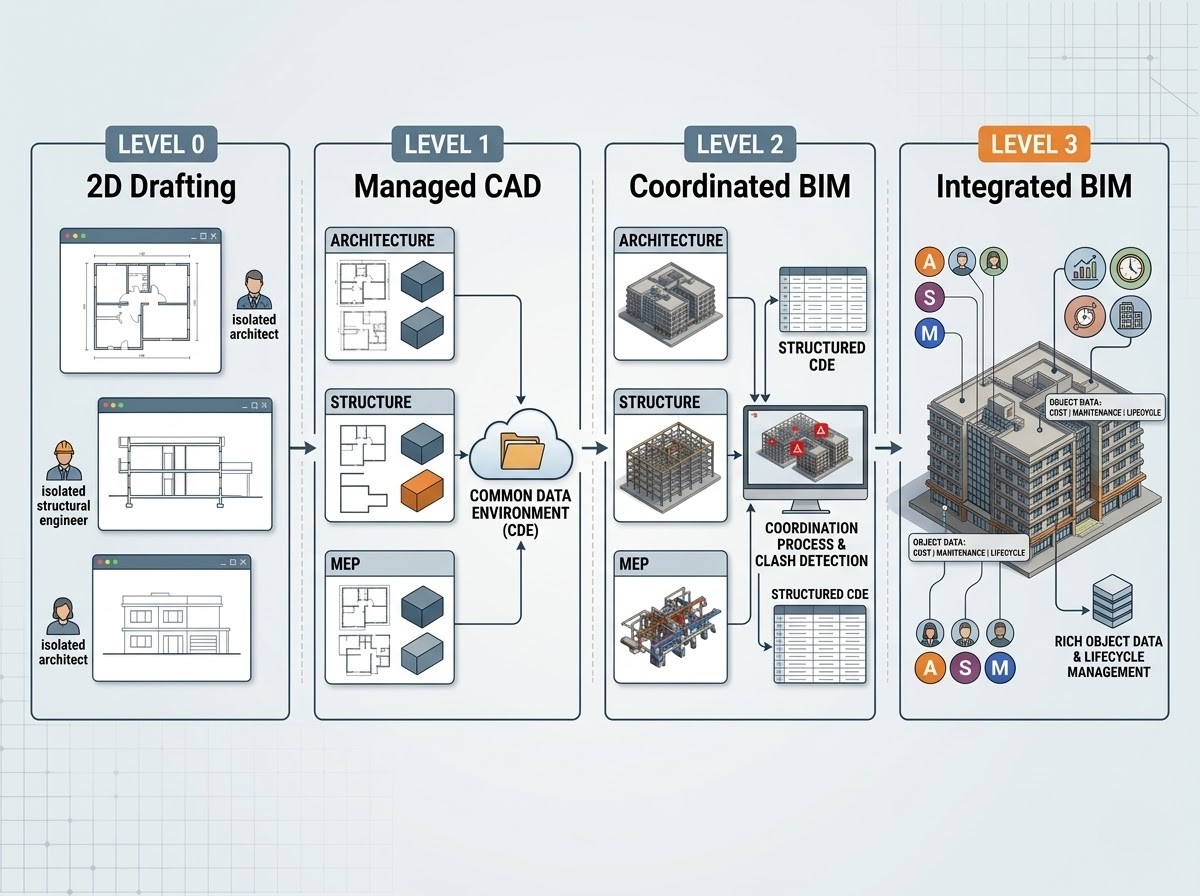
The construction industry uses BIM maturity levels to describe how much collaboration and data sharing is happening on a project.
Level 0
Basic 2D drafting with no shared data between teams. Each discipline works in isolation. This is the old way of doing things and is rare on commercial projects today.
Level 1
Managed CAD with some 3D modeling, but each team still works in its own environment. There is a common data environment for sharing files, but the models are not coordinated in real time.
Level 2
This is where most of the construction industry sits right now. Each discipline produces its own BIM model, and those models are shared and coordinated through a structured BIM process. The models are not in one single file, but they are reviewed together for clashes and coordination issues. BIM Level 2 requires a Common Data Environment for managing project information and data exchange between teams.
Level 3
A fully integrated BIM environment where all disciplines work on a single shared model in real time. BIM Level 3 is still more of a goal than a reality for most projects, but cloud platforms and CDE tools are pushing the construction industry closer to it. At this level, BIM objects carry rich data that supports not just coordination but also lifecycle management, cost estimation, and facilities management.
Benefits of BIM Modeling for Construction Projects
- BIM improves coordination between architectural, structural, and MEP teams because all systems are visible in the same model.
- Conflicts between building systems are caught during design instead of during construction, which is where they cost the most to fix. This is what clash detection and MEP coordination are built around.
- Rework, schedule delays, and wasted materials drop on projects that run BIM coordination because the routing and clearances are verified before installation.
- Project visualization gets better for owners, designers, and contractors. A 3D model communicates design intent in ways that 2D drawings cannot.
- Scheduling and cost planning become more accurate when linked to BIM data through 4D and 5D workflows.
- Prefabrication and modular construction become possible because the coordination data is reliable enough to fabricate from.
- BIM data can support facility management after construction is done, giving building operators a digital record of what was actually built.
These are not theoretical benefits. They show up on every project that runs a real BIM process, with fewer RFIs, lower change order counts, and trades that move through the building without stopping to wait for answers.
Common BIM Tools Used in the Construction Industry
Most BIM workflows in the AEC industry run on a handful of platforms that have become the standard.
Autodesk Revit is the most widely used BIM modeling software for creating architectural, structural, and MEP models. It is the primary BIM authoring tool on most commercial projects. Navisworks is used for model federation and clash detection, combining discipline models into one environment for coordination review. AutoCAD still plays a role for 2D drafting tasks that sit alongside BIM workflows. Autodesk BIM 360 handles cloud collaboration, file sharing, and version control across project teams. Revizto is used for visual issue tracking during coordination meetings. For structural steel and concrete detailing, some teams also use Tekla Structures alongside Revit.
Beyond individual BIM software tools, the industry is moving toward Common Data Environment (CDE) platforms that centralize all project information, models, and documents in one place. BIM standards like ISO 19650 define how project data should be managed and exchanged across teams, and adoption of these standards is growing across the construction industry.
The right combination of tools depends on the project scope, the number of disciplines involved, and what the team is already using.
Where BIM Modeling Is Used
BIM modeling is used on any project where multiple systems and trades need to be coordinated.
- Commercial office buildings and mixed-use developments
- Healthcare facilities with dense MEP systems
- Industrial projects with process piping and heavy equipment
- Residential and multi-family developments
- Infrastructure projects, including bridges, roads, and transit
- Renovation and retrofit work where existing conditions need to be documented
The more complex the project and the more trades involved, the more BIM coordination pays off.
BIM Modeling vs. Digital Twin
BIM and digital twins are related but not the same thing.
BIM is used during design, coordination, and construction. The BIM model represents what the building is supposed to look like and how its systems are supposed to work together. It is a planning and coordination tool that supports the building lifecycle from design through handover.
A digital twin is used after construction for live monitoring and operations. It connects to real-time data from IoT sensors in the building and reflects what is actually happening, not just what was planned. Temperature readings, energy usage, equipment status, and occupancy data feed into the digital twin to support ongoing facilities management and lifecycle management decisions.
BIM can serve as the starting point for a digital twin because the model already contains the building geometry and system data. But a BIM model on its own does not become a digital twin until it is connected to live operational data. The digital transformation happening in the construction industry is pushing these two concepts closer together, but they still serve different purposes at different stages.
Challenges of BIM Modeling
BIM is not without friction. Adopting it takes effort, investment, and buy-in from the full project team.
The biggest challenge is people. BIM requires trained professionals who understand both the software and the construction workflows behind it. A modeler who does not understand how trades install systems will produce a model that looks right but does not coordinate well. That is one reason firms bring in outside BIM consulting to set up standards and execution plans before modeling starts.
Software and hardware investment is real. BIM software like Revit, Navisworks, and cloud collaboration platforms all carry licensing costs. The machines running them need enough processing power to handle large models without slowing down.
BIM works best when all teams on the project are aligned on BIM standards, naming conventions, and coordination processes. When one trade is working in BIM, and another is still submitting 2D PDFs, the coordination breaks down. That alignment takes time and planning at the start of a project, which is why BIM standards like ISO 19650 and frameworks like the National BIM Standard-United States exist to give teams a common starting point.
Resistance to change is still a factor. Some project teams and firms are slow to move away from the workflows they have used for decades. BIM adoption tends to accelerate once a team sees the results on one project, but getting to that first project can take convincing.
How HSE Contractors Supports BIM Workflows
HSE Contractors works with architects, engineers, and contractors on BIM projects across the country. The team supports different stages and disciplines within the BIM process, from model creation through coordination and construction planning.
Whether a project needs architectural, structural, or MEP models built from scratch, coordination across trades before construction, or advisory support on BIM execution planning and standards, HSE has the team and the process to handle it. The work spans commercial, healthcare, industrial, and large-scale projects nationwide.
Why BIM Modeling Matters More Than Ever
Construction projects are getting more complex. More systems, more trades, tighter schedules, and less room for error. BIM modeling gives project teams a way to see the full building before it is built, coordinate systems before they conflict, and produce documentation that stays accurate as the design changes.
The industry has moved past the point where BIM is a nice-to-have. On most commercial projects today, it is the expected workflow. Teams that run a real BIM process see fewer surprises in the field, spend less money on rework, and hand over buildings that match what was planned. That is why it matters.
Get Expert Guidance on Your Construction Project
Schedule a complimentary 20-minute consultation with our BIM Modeling experts and receive personalized guidance on optimizing your project’s performance. Our offices in Orlando, New York City, Boston, Los Angeles, San Francisco, Miami, Tampa, Chicago, Denver, Brooklyn, Dallas, and Washington, DC offer innovative solutions nationwide. Contact Us Today!
